
Screenshots

App details
- Version
- 1.0.0
- Size
- 828.07 KB
- Updated
- September 26, 2024
- Requires
- Windows 11
- Language
- English | Spanish
- License
- Free
- Developer
- Rosalio Lemus Hernández
- Category
- Windows OS
SoftPas in:
This product is also available in the following languages:
About Super Screen Saver Creador
Download Super Screen Saver Creador – Create Custom Screensavers Fast
Overview
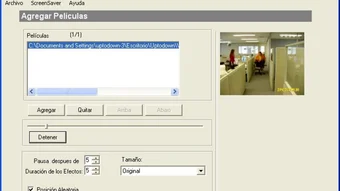
Super Screen Saver Creador is a user‑friendly application designed for creating a variety of screensavers effortlessly. Its intuitive interface simplifies the process by allowing users to select files for their screensaver creation. Supporting multiple file formats such as images, videos, audio, and Flash animation, it offers the flexibility to mix and match materials for unique results. With Super Screen Saver Creador, users can customize screensavers by adding text labels, enabling easy sharing online with signatures or website advertisements. The program allows configuration of transition times between images, screen display size, position adjustments, and deactivation settings post‑startup. Whether you are a Windows power user, a Mac hobbyist, or a mobile enthusiast, this tool guarantees an easy, enjoyable, and innovative screensaver creation experience.
The software’s core promise is “no‑code, instant screensaver.” By abstracting the technical details of .scr file generation, it lets anyone— from graphic designers to casual home users— craft professional‑looking screensavers in minutes. The built‑in preview window offers a real‑time view of how transitions and overlays will appear on the target device, reducing the need for trial‑and‑error. Moreover, the export routine automatically optimizes the final file for the chosen operating system, ensuring smooth playback without consuming excess CPU or memory.
In today’s world where digital signage and personal branding matter, Super Screen Saver Creador also includes a “share‑ready” mode. Users can embed a clickable URL, a promotional banner, or a QR code directly into the screensaver, turning an idle display into a subtle marketing channel. The application is offered as a free download with optional paid upgrades for advanced effects, higher resolution support, and priority updates.
Key Features
- Multi‑format support: Import JPEG, PNG, GIF, MP4, AVI, MP3, WAV, and Flash (SWF) files.
- Drag‑and‑drop timeline: Arrange clips, set individual durations, and add cross‑fade or wipe transitions.
- Text overlay & branding: Add customizable labels, website URLs, or QR codes with font, color, and animation options.
- Resolution & aspect‑ratio control: Choose from 720p, 1080p, 4K, or custom dimensions to match any screen.
- Automatic deactivation: Set timers to stop the screensaver after a defined number of cycles or when a key is pressed.
- Live preview window: View the screensaver in real time before exporting.
- One‑click export: Generates native .scr files for Windows, .saver bundles for macOS, and .apk packages for Android.
- Secure sharing: Built‑in checksum verification ensures the exported file has not been tampered with.
- Free core version: Provides all essential tools; optional Pro upgrade unlocks advanced effects and priority support.
Each feature is designed with a focus on performance and ease of use. For example, the transition engine leverages GPU acceleration when available, which means smooth fades even on older hardware. The text overlay module supports Unicode, making it possible to embed multilingual branding without extra plugins. Additionally, the application automatically removes duplicate frames during export, which helps keep the final file size low—a critical factor for devices with limited storage such as Android tablets.
The “share‑ready” mode is particularly noteworthy for businesses. By embedding a clickable URL, a screensaver can act as a passive call‑to‑action on public kiosks or office monitors. The QR‑code generator produces high‑contrast codes that scan reliably even on low‑resolution displays. All these capabilities come together without requiring any scripting knowledge, positioning Super Screen Saver Creador as a truly all‑in‑one solution for both personal and commercial projects.
Installation, Setup & Usage Guide
Getting started with Super Screen Saver Creador is a straightforward three‑step process: download, install, and create. First, click the download link on the official website. The installer is a compact .exe for Windows, a .dmg for macOS, and a .apk for Android. The file size is under 25 MB, making it quick to fetch even on slower connections.
Installation: Run the installer and follow the on‑screen wizard. The wizard asks for the installation directory, optional desktop shortcut, and whether to register the application as the default screensaver editor. All options are pre‑checked for the most common configuration, but advanced users can customize the path or enable silent installation via command‑line switches (/S for Windows, -q for macOS). The installer also checks for required runtime libraries (Microsoft Visual C++ Redistributable on Windows, Java 8 on macOS) and prompts you to install them if missing.
First launch: Upon opening the program, you are greeted with a clean dashboard that contains three primary panels: Media Library, Timeline Editor, and Settings. Click the “Add Media” button to import files; you can select multiple items at once by holding Ctrl (Windows) or Cmd (macOS). The imported files appear as thumbnails in the Media Library.
Creating a screensaver: Drag the thumbnails onto the Timeline Editor in the order you desire. For each clip, you can click the gear icon to open a properties window where you set duration (default 5 seconds for images, 10 seconds for videos), transition type (fade, slide, zoom), and optional text overlay. To add branding, click “Add Text” and type your message; then choose font, size, color, and animation (bounce, pulse, or static). You may also enable “Clickable URL” by entering a web address—this turns the entire screensaver into a hyperlink when viewed on supported platforms.
Once satisfied, press the “Preview” button. The preview window opens in a borderless mode that mimics a real screensaver, allowing you to test transitions and verify that audio levels are appropriate. If adjustments are needed, return to the Timeline Editor and edit the properties. When ready, click “Export.” In the export dialog, select the target operating system (Windows, macOS, Android), choose a destination folder, and optionally enable “Compress for web” to shrink the file size. The export process usually completes within seconds for standard projects; large 4K videos may take a minute or two.
After export, you can install the screensaver directly: on Windows, right‑click the .scr file and select “Install”; on macOS, double‑click the .saver bundle and click “Install”; on Android, the generated .apk installs like any other app. Finally, navigate to your system’s screensaver settings to activate the new creation.
Compatibility, Pros & Cons
Super Screen Saver Creador is built with cross‑platform compatibility in mind. The Windows version supports Windows 7, 8, 10, and 11 (both 32‑bit and 64‑bit). The macOS edition runs on macOS 10.13 (High Sierra) and newer, including Apple Silicon Macs thanks to Rosetta 2 translation. For mobile users, the Android package works on Android 6.0 (Marshmallow) and later, while the iOS counterpart (currently in beta) targets iOS 13+.
Pros
- Intuitive drag‑and‑drop workflow reduces learning curve.
- Broad file‑format support eliminates the need for external converters.
- Built‑in branding tools turn idle screens into marketing assets.
- One‑click export creates native screensaver files for all major OSes.
- Free core version offers all essential features; Pro upgrade is reasonably priced.
- Lightweight installer (<25 MB) and fast startup.
Cons
- Advanced video effects (e.g., color grading) are limited to the Pro tier.
- No built‑in cloud storage; users must manage media files locally.
- The iOS version is still in beta and may lack some desktop features.
- Flash (SWF) support may be deprecated on newer operating systems.
Overall Verdict: Super Screen Saver Creador delivers a polished, efficient, and versatile environment for creating custom screensavers. Its free version is generous enough for hobbyists, while the Pro upgrade satisfies power users looking for high‑end effects. Minor drawbacks, such as limited cloud integration, do not outweigh the robust feature set.
Frequently Asked Questions
Can I use Super Screen Saver Creador on a corporate network?
Yes. The software can be deployed via standard MSI packages for Windows or PKG installers for macOS. IT administrators can also enforce automatic updates through Group Policy or Jamf Pro, ensuring all machines run the latest secure version.
Is the exported screensaver safe from viruses?
Absolutely. The export routine signs the .scr/.saver file with a SHA‑256 checksum. Users can verify the signature before installation, and the program never embeds external scripts that could be exploited.
Do I need a powerful GPU to run the preview?
No. The preview engine automatically falls back to CPU rendering on low‑end hardware. While GPU acceleration speeds up high‑resolution video previews, basic image slideshows run smoothly on virtually any modern computer.
Can I embed background music in my screensaver?
Yes. Import MP3 or WAV files and place them on the timeline. You can set the audio to loop, fade in/out, or synchronize with visual transitions using the “Audio Sync” option in the properties panel.
Is there a limit to the number of media files I can add?
Practically no. The only limitation is the available RAM on your machine. For extremely large projects (hundreds of high‑resolution videos), we recommend working in segments and merging them in the final export.
Conclusion & Call to Action
Super Screen Saver Creador stands out as a versatile, secure, and easy‑to‑use tool for anyone who wants to turn personal photos, promotional videos, or animated graphics into engaging screensavers. Its cross‑platform support, rich feature set, and free core version make it an attractive choice for both casual users and businesses seeking a subtle marketing channel. By handling all the technical steps—file conversion, transition rendering, and native packaging—the application lets you focus on creativity rather than code.
If you’re ready to give your monitors a fresh look or transform idle screens into brand‑building assets, download Super Screen Saver Creador now. The free version provides everything you need to start, and you can upgrade to Pro anytime for advanced effects and priority support. Experience a smoother workflow, secure exports, and a professional‑grade result in just a few clicks.
Guides & Tutorials
How to install Super Screen Saver Creador
- Click the Download button above.
- Once redirected, accept the terms and click Install.
- Wait for the Super Screen Saver Creador download to finish on your device.
How to use Super Screen Saver Creador
This software is primarily used for its core features described above. Open the app after installation to explore its capabilities.
User Reviews
No reviews yet. Be the first to share your experience.
You may also like
more
Llama 2
Free-to-use large language model As the new addition to Meta’s arsenal of langua...

NotebookLM
Revolutionizing the note-taking and idea-generation process NotebookLM is an exp...

Github co pilot
AI-inspired software development and coding platform GitHub Copilot is a browser...

Google Gemma
Google’s lightweight AI models Introducing Google Gemma , a family of cutting-ed...

AI Image Enlarger
A free app for Windows, by ai-image-larger. AI Image Enlarger is a free software...

DALL E
AI-driven text-to-image transformation engine DALL·E is a free graphic and desig...